Watch Now
Announcing the launch of Org-Native Agents.
Generative AI refers to artificial intelligence systems that can create content, including text, images, and code. These systems learn from large datasets to generate new outputs that resemble the learned information. Unlike traditional AI, which focuses on analysis and decision-making, generative AI is about creation of new content and artifacts that can be useful for humans.
This technology has rapidly evolved, with large language models (LLMs) like OpenAI’s GPT and Google’s Gemini leading the way. State-of-the-art LLMs have remarkable cognitive capabilities and are able to match or even surpass humans on many tasks. Generative AI’s ability to produce novel content has wide applications, from creative arts to technical fields like software development and testing.
This is part of a series of articles about AI coding tools.
While still an emerging technology, generative AI is already widely used in several development areas.
Generative AI streamlines coding by suggesting completions or generating code snippets based on brief descriptions. This reduces manual coding and speeds up development. It also enables rapid prototyping. Developers can input requirements and the AI generates a prototype, allowing for quick adjustments. AI tools understand programming languages and context, helping developers create code more efficiently.
Generative AI aids in identifying and correcting errors in code. By learning from a large set of existing codebases, AI can analyze a function, entire program, or even an organization’s entire codebase, and detect anomalies or errors that human developers might miss. This immediate feedback ensures higher code quality and reliability and reduces debugging time. In addition to detecting bugs, AI systems can recommend fixes automatically.
Generative AI can analyze the structure and functionality of code to automatically generate test scenarios, including edge cases that human testers might not consider. AI coding assistants are able to automatically write unit tests, which represent a major burden for development teams. This speeds up the testing process but helps improve test coverage.
AI can automate many aspects of technical documentation. By analyzing code, it can generate comments and documentation, minimizing developers’ manual effort. This improves code maintainability and understandability and makes it easier to keep documentation aligned with code changes.
Generative AI tailors learning experiences for developers, offering personalized guidance and resources. It adapts to each developer’s skill level, providing relevant examples and exercises. AI also offers real-time assistance, suggesting improvements and teaching best practices. This boosts developer skills, encouraging continuous learning.
Related content: Read our guide to AI for software testing.
Generative AI is a tool that can augment and enhance the software development process. It can automate repetitive tasks, suggest code improvements, generate documentation, and even help debug programs. However, the idea of it completely replacing human developers overlooks the nuanced, creative, and often highly contextual work that developers do.
While generative AI can generate code, suggest fixes, and automate testing, it lacks the ability to understand the deeper, unspoken requirements of a project. Human developers can interpret and navigate the needs of stakeholders and adapt to changing requirements. These aspects of development require empathy and foresight, which AI, as of now, does not possess.
In addition to writing code, software development is about creating solutions that are viable, sustainable, and ethical. Developers play a crucial role in ensuring that software meets human standards, is secure, and does not inadvertently perpetuate biases. While AI can be trained to recognize patterns of bias or security flaws, human judgment is still required.
Human developers are capable of learning, adapting, and innovating in ways that AI, which depends on existing data and algorithms, cannot. The creativity and innovation that humans bring to software development are irreplaceable. However, generative AI will likely change the nature of software development, with repetitive and clearly definable tasks being automated.
There are several issues that developers and organizations must consider regarding the use of generative AI to augment coding practices.
Generative AI tools in software development must adhere to strict security and compliance guidelines, which can be challenging. AI-generated code might inadvertently introduce security vulnerabilities if not properly vetted. An AI system trained on publicly available code might replicate patterns that include known vulnerabilities.
It is important to ensure that AI tools provide code that does not introduce license compliance issues. Code generated by AI tools could potentially be subject to commercial licenses or restrictive open source licenses, raising legal issues if it is used in commercial software.
AI models trained on large datasets may accidentally leak or misuse sensitive information, particularly when handling proprietary or confidential data. Ensuring that AI systems only access appropriate datasets and that they isolate and protect data is critical to maintaining privacy and trust, especially in industries like finance or healthcare where data sensitivity is important.
Learn more in our detailed guide to AI code refactoring.
The growing role of AI in coding will likely affect the work of software developers and engineers in several ways.
As generative AI takes over more routine coding tasks, software developers and engineers will find their roles evolving toward higher-level problem-solving and system architecture design. This shift means that developers will spend less time writing boilerplate code and more time designing systems that meet complex user needs.
Developers will become architects of solutions, focusing on how different components of a project fit together and optimizing for efficiency, scalability, and maintainability. This evolution will require a deeper understanding of both business and technology landscapes, as developers will need to anticipate future needs and design systems that can adapt to changing requirements.
The integration of AI in software development processes will lead to more streamlined and efficient development cycles. By automating tasks such as code generation, bug fixing, and testing, AI allows development teams to focus on critical aspects of project development, reducing the time to market for new software products.
This acceleration of the development cycle does not just mean faster releases; it also implies that teams can iterate more rapidly on feedback, enhancing the quality and relevance of software solutions. Consequently, developers will need to adapt to an even more fast-paced environment, focusing on rapid prototyping, continuous integration, and delivery models.
With the mundane aspects of coding and testing increasingly handled by AI, developers will have more time to dedicate to innovation and exploration of new technologies. This opportunity to innovate is not just about creating new products but also about finding novel ways to solve existing problems.
In the past, senior roles like chief technology officers (CTOs) and software architects were mainly responsible for investigating new technologies and deriving value from them, while software engineers were mainly responsible for implementing existing technologies. In the future, it’s likely that software engineers will spend much more of their time exploring new technologies. Using generative AI, developers will rapidly prototype to identify new opportunities, or even propose new features and products.
As AI handles more of the technical load, the role of software developers will expand to involve more cross-disciplinary collaboration. Engineers will work closely with professionals from other fields — such as data science, design, and business — to create comprehensive solutions that address broader challenges. Generative AI will provide a common language that allows everyone, including nontechnical roles, to understand and contribute to codebases.
This collaboration will not only enhance the functionality and user experience of software products but also ensure they are ethically designed and socially responsible. The ability to communicate effectively across disciplines, understand diverse perspectives, and integrate this knowledge into software design will become key skills for developers in an AI-augmented future.
Learn more in our detailed guide to AI pair programming.
Tabnine is the AI code assistant that you control — helping development teams of every size use AI to accelerate and simplify the software development process without sacrificing privacy, security, or compliance. Tabnine boosts engineering velocity, code quality, and developer happiness by automating the coding workflow through AI tools customized to your team. Tabnine is trusted by more than 1,000,000 developers across thousands of organizations.
Unlike generic coding assistants, Tabnine is:
Boost developer productivity with AI-powered chat and code completions
Tabnine offers best-in-class AI code completion and an AI-powered chat that increases productivity and accelerates the entire software development lifecycle.
Here’s what you can do with Tabnine:
To learn more about Tabnine, check out our Docs or contact us to schedule a demo with a product expert. If you want to try it out for yourself today, sign up here to try it free for 90 days.
Basic AI coding assistants, while helpful, often fall short of delivering the most relevant and contextually accurate code suggestions due to their reliance on a general understanding of software languages and the most common patterns for writing software. These coding assistants generate code that is suited to solve the problems they are tasked with but are often not aligned with an individual team’s coding standards, conventions and styles. This typically results in a need to modify or refine their recommendations in order for the code to be accepted into the application.
AI coding assistants typically function by leaning on the knowledge contained within a specific large language model (LLM), and applying general coding principles across various scenarios. Therefore, typical AI assistants often lack the ability to understand the specific context of a project, leading to suggestions that, while syntactically correct, might not align with a team’s unique guidelines, expected approach or architectural designs. The LLMs that underpin generative AI systems operate based on a fixed set of training data, which does not evolve dynamically as the project progresses. This static approach can result in mismatches between the generated code and the project’s current state or requirements, necessitating developers to make further manual adjustments.
There is a misunderstanding that AI assistants simply interact with an LLM to generate the results a user is looking for. Whether you are generating text, images or code, the best AI assistants use a complex set of guidelines to ensure that what the user asks for (e.g., a software function that accomplishes a specific task) and what gets generated (a Java function, in the correct version, with the correct parameters for the application) are aligned.
One of the proven techniques to get the best outputs from any LLM is to provide additional context with the prompt. This approach, referred to as retrieval-augmented generation (RAG), has become a critical component of chatbots, AI assistants and agents that successfully serve enterprise use cases.
AI coding assistants, like all generative AI tools, use LLMs as the foundation for code generation. Bringing highly tailored RAG to coding assistants enables them to generate code that is of higher quality and more closely aligned with a company’s existing codebase and engineering standards.
In the realm of chatbots, RAG considers existing data available in structured and unstructured formats. Through either full-text or semantic search, it retrieves just enough context and injects it into the prompt sent to the LLM.
An AI coding assistant can use a similar (albeit more complex) approach, retrieving context from the existing codebase through the integrated development environment. A high-performing AI coding assistant can crawl the project workspace to access additional context from the current file, open files, Git history, logs, project metadata and even connected Git repositories.
RAG empowers AI coding assistants to provide highly relevant and precise results by considering specific aspects of the project, such as existing APIs, frameworks and coding patterns. Instead of offering generic solutions, the AI assistant tailors its guidance to align with the project’s established practices, like suggesting database connections consistent with the current implementation or providing code recommendations that seamlessly incorporate private APIs. By utilizing RAG, the assistant can even generate test functions that mirror the structure, style and syntax of your existing tests, ensuring that the code is both contextually accurate and aligned with the project’s requirements.
This approach can result in unparalleled personalization that is easy for developers to immediately accept.
Let’s take a look at the steps involved in implementing RAG for coding assistants.
The first phase is indexing and storing. Initially, when the coding assistant is installed and integrated into the development environment, it performs a search and identifies all relevant documents that can add context. It then splits each document into chunks and sends them to an embedding model. The embedding model is responsible for converting each chunk into a vector without losing its semantic representation. The resulting vectors are stored in a vector database for future retrieval. Periodically, the coding assistant may scan the workspace and add documents to the vector database.
During the next phase, coding, a developer may create a comment or use the chat assistant to generate a specific function. The assistant uses the prompt to perform a similarity search on the previously indexed collection stored in the vector database. The outcome of this search is retrieved and used to augment the prompt with relevant context. When the LLM receives the enhanced prompt along with the context, it generates a code snippet that is aligned with the code already present in the context.
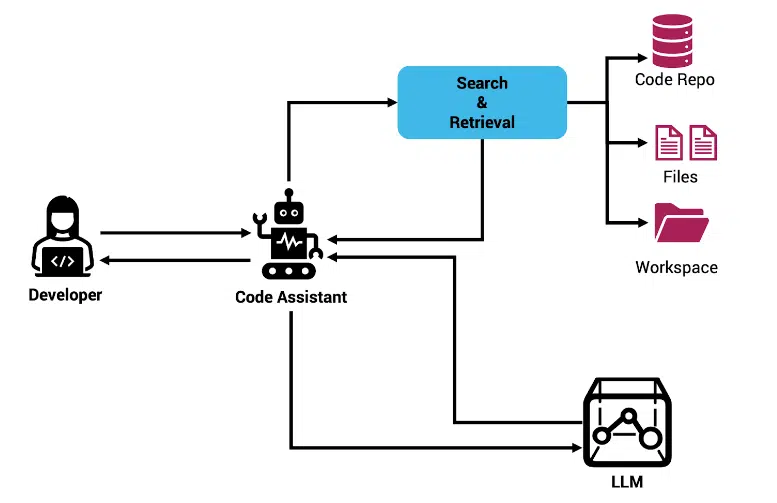
Applying RAG to coding assistants improves the performance, accuracy and acceptability of LLM-generated code. It significantly enhances the tool’s utility and reduces the time developers spend rewriting or adjusting the AI-generated code. Having a direct alignment with the project’s existing codebase leads to higher accuracy in code suggestions and greatly improves developer productivity and code quality.
“Using an AI coding assistant that is not sufficiently aware of your existing code base and your coding standards is like hiring a well-trained software engineer off the street: helpful and well-intentioned, but likely to create code that needs to be modified to fit your application. When you layer in the right level of context — including local files, the codebase of the project or company, and relevant non-code sources of information — it’s like having a senior engineer with years of experience in your company sitting alongside your developers,” said Peter Guagenti, president of Tabnine. “The numbers prove this out. Tabnine users who allow us to use their existing code as context accept 40% more code recommendations without modifications. That number climbs even higher when Tabnine is connected to a company’s entire repository.”
This is one-way RAG addresses the limitations of scalability and adaptability that hamper traditional coding assistants. As projects grow and evolve, RAG-equipped tools continuously learn and adapt, refining their suggestions based on new patterns and information gleaned from the codebase. This ability to evolve makes RAG a highly robust tool in a dynamic development environment.
Semantic retrieval-augmented generation (SEM-RAG) is an advanced iteration of RAG techniques tailored to extend RAG’s accuracy and contextualization. It enhances coding assistants by using semantic memory instead of vector search to integrate semantic understanding into the retrieval process.
Unlike traditional RAG, which primarily relies on vector space models for retrieving relevant code snippets, SEM-RAG employs a more nuanced semantic indexing approach. This method leverages static analysis to deeply understand the structure and semantics of the codebase, identifying relationships and dependencies within the code elements.
For instance, SEM-RAG can analyze import statements in languages like Java and TypeScript, enabling it to pull in contextually relevant code elements from libraries — even when direct access to the source code is not available. This capability allows SEM-RAG to comprehend and utilize imported libraries’ bytecode, effectively using these insights to enrich the context provided to the language model.
While traditional RAG significantly improves the relevance of code suggestions by matching vectorized representations of code snippets with queries, it sometimes lacks the depth to fully grasp the semantic nuances of complex software projects. SEM-RAG addresses this limitation by focusing on the semantic relationships within the code, resulting in a more precise alignment with the project’s coding practices. For example, by understanding the relationships and dependencies defined in a project’s architecture, SEM-RAG can offer suggestions that are not only contextually accurate but also architecturally coherent. This enhances performance by generating code that integrates seamlessly with existing systems, reducing the likelihood of introducing errors or inconsistencies.
SEM-RAG’s approach to treating code as interconnected elements rather than isolated snippets allows deeper contextualization than traditional RAG provides. This depth of understanding promotes a higher degree of automation in coding tasks, particularly in complex domains where interdependencies within the codebase are critical. Therefore, SEM-RAG not only maintains all the benefits of traditional RAG but also surpasses it in environments where understanding the deeper semantic and structural aspects of code is paramount. This makes SEM-RAG an invaluable tool for large-scale and enterprise-level software development, where maintaining architectural integrity is as important as code correctness.
Choosing an AI coding assistant that incorporates contextual awareness through advanced techniques like RAG and SEM-RAG marks a transformative step in the evolution of software development tools. By embedding a deep understanding of the codebase’s context, these assistants significantly enhance the accuracy, relevance and performance of the code they generate. This contextual integration helps ensure that suggestions are not only syntactically correct but also align with your specific coding standards, architectural frameworks and project-specific nuances, effectively reducing the gap between AI-generated code and human expertise.
RAG-enabled AI assistants significantly increase developer productivity and improve code quality. Developers can rely on these enhanced AI assistants to generate code that not only fits the task but that fits seamlessly into the larger project context, thereby minimizing the need for revisions and accelerating the development cycle. By automating more aspects of coding with a high degree of precision, these context-aware coding assistants are setting new standards in software development, pushing towards a future where AI tools understand and adapt to the complex dynamics of project environments as comprehensively as the developers themselves.
This article was originally posted on The New Stack.
C is a highly efficient and flexible programming language that forms the basis of many modern languages. Its direct access to memory and low-level hardware makes it ideal for system-level programming. However, this also makes it susceptible to complex bugs that might be less common in higher-level languages.
C debugging is the process of identifying, diagnosing, and rectifying errors or bugs in your C code. These bugs may cause your software to behave unexpectedly or crash, leading to a poor user experience. Mastering debugging is an essential skill for every C programmer.
This is part of a series of articles about code debugging.
Memory leaks are a common type of bug in C programming. When you dynamically allocate memory using functions such as malloc(), calloc(), or realloc() and fail to free it when no longer needed, it leads to a memory leak. This bug is particularly insidious because it doesn’t usually cause a program to fail immediately. Instead, it subtly consumes the system’s memory, leading to slow performance over time. And if left unchecked, it may eventually cause the system to run out of memory.
Code example:
#include <stdlib.h>

int main() {

    int *ptr = (int *)malloc(sizeof(int) * 10); // Allocate memory for 10 integers

    // Perform some operations with ptr

    // Forget to free the memory

    // free(ptr);

    return 0;

}
In this example, we allocate memory for an array of 10 integers using malloc() but forget to free the memory with free(). This can eventually lead to a memory leak.
Another common bug in C programming is buffer overflow. This occurs when you attempt to store more data in a buffer (an array or a character string) than it was designed to hold. Buffer overflows can lead to erratic program behavior, including unexpected termination, incorrect results, or even a security vulnerability allowing malicious code execution.
Code example:
#include <string.h>

int main() {

    char buffer[10];

    strcpy(buffer, "This string is too long for the buffer");

    return 0;

}
In this example, we have a buffer that can hold 10 characters. We then attempt to copy a much longer string into it, which leads to a buffer overflow.
Modern C compilers throw a warning in these cases, as shown below:

Uninitialized variables are yet another commonplace bug in C programming. Unlike some other programming languages, C does not automatically initialize variables. Therefore, if you declare a variable and use it without initializing it, the variable has an undefined value. This can lead to unpredictable program behavior, as the value of the uninitialized variable may change each time the program runs.
Code example:
#include <stdio.h>

int main() {

    int x;

    printf("%d\n", x);  // x is uninitialized

    return 0;

}
The variable x is declared but not initialized. When we attempt to print its value, it will contain some undefined data, or 0, depending on your compiler.
In C programming, arrays are a fixed size, and the compiler does not check whether an index is within the bounds of the array. Therefore, a common bug is accessing an array out of its bounds, either reading from or writing to an invalid index. This can lead to incorrect results, program crashes, or overwriting unrelated data.
Code example:
#include <stdio.h>

int main() {

    int arr[5] = {1, 2, 3, 4, 5};

    printf("%d\n", arr[10]);  // Index out of bounds

    return 0;

}
In this example, we attempt to access an element at index 10 of an array that only has 5 elements, which results in out-of-bounds access.
Learn more in our detailed guide to VS Code Debugging.
Here are the basic techniques you can use to debug C code.
One of the most simple and straightforward techniques for C code debugging is using print statements. By inserting printf() statements at strategic points in your code, you can monitor the flow of your program and the state of important variables. While this technique may seem primitive, it is surprisingly effective and is often the first step in debugging.
Utilizing breakpoints is another important technique in C code debugging. A breakpoint is a signal that tells the debugger to temporarily halt the execution of your program at a certain point. This allows you to inspect the state of your program, check the values of variables, and step through your code one line at a time to see exactly where things go wrong.
Step-through debugging is a more advanced debugging technique that involves executing your program one line at a time. With each step, you can observe the changes in your variables and the flow of your program. This is particularly useful for understanding complex control structures and pinpointing the exact location of a bug.
Debugging multithreaded C programs is a bit more complicated due to the concurrent execution of multiple threads. However, modern IDEs and debuggers offer features such as thread-specific breakpoints and the ability to switch between threads. This allows you to isolate and debug each thread individually, making it easier to identify and fix concurrency-related bugs.
Here is a general process you can follow to effectively debug C programs.
Before you can start debugging your C code, the first step is to understand the problem. Without a clear understanding of the issue, you risk wasting precious time and resources going down the wrong path. Start by examining the error messages you’re getting. These usually provide important clues about what’s going wrong.
Next, isolate the problem area in your code. Try running different sections of the code independently to identify where the issue lies. If you can pinpoint the section of the code that’s causing the error, you’ll be able to focus your debugging efforts more effectively.
Once you’ve understood the problem, it’s time to start with some simple checks. This is an important step in C code debugging because it can save you a considerable amount of time. Start by checking for common errors like syntax errors, misspelled variables, wrong function calls, variable initializations, or incorrect data types.
Next, make sure that your code logic is correct. In some cases, the problem isn’t with the C syntax but with the logic of your program. Ensure that the conditions, loops, and function calls are working as expected.
By printing out the values of variables at different points in your program, you can track how they change and identify where things start to go wrong.
First, identify the critical variables in your code. These are variables that play a significant role in the operation of your program. Next, insert print statements to monitor the values of these variables as the program runs. This can help you spot unexpected changes or inconsistencies that might be causing issues.
Another important step in C code debugging is compiling your code with debugging information. This involves using the -g option when compiling with the gcc compiler. This will include additional information in the executable file that can be used by a debugger to analyze your program.
Once you’ve compiled your program with debugging information, you can run it under a debugger. This will allow you to control the execution of the program, inspect the values of variables at any point, and even change them if necessary.
Remember, compiling with debugging information can make your executable file larger and slower to run. Therefore, it’s generally a good idea to do this only when you’re actively debugging your program.
Using a C code debugger can take your debugging process to the next level. A debugger allows you to execute your program step by step, pause it at any point, inspect the values of variables, and even modify them.
There are several good debuggers available for C, including GDB, LLDB, and Microsoft’s Visual Studio Debugger. Each of these debuggers has its own set of features and commands, so you’ll need to spend some time learning how to use them effectively.
Remember, even with a good tool, effective debugging still requires a good understanding of your code and the problem you’re trying to solve.
By keeping a record of the problem and how you solved it, you can save yourself a lot of time and effort in the future, and can help others in your team or community who are facing the same issue.
Start by writing a clear, concise description of the problem. Include any error messages, the results of your initial investigation, and any theories you have about what’s causing the issue.
Next, document the steps you took to solve the problem. This should include any changes you made to your code, the results of your debugging sessions, and the final solution. It’s also a good idea to include any lessons learned or insights gained during the process.
This process can be time consuming, and often debugging tasks take up a large part of a developer’s valuable time. Today it’s possible to largely automate this process and debug your code with low effort, by leveraging generative AI technology.
Learn more in our detailed guide to Python Code Debugging.
Recent advances in generative AI can be a big help to development teams overloaded with debugging tasks. Tabnine is an AI code assistant that can predict and generate code completions in real time, and can provide automated debugging suggestions, which are sensitive to the context of your software project. Tabnine supports C and all other popular programming languages.
Tabnine is an AI code assistant that helps development teams of every size use AI to accelerate and simplify the software development process without sacrificing privacy, security, or compliance. Tabnine boosts engineering velocity, code quality, and developer happiness by automating the coding workflow through AI tools customized to your team. Tabnine supports more than one million developers across companies in every industry.
Read more about AI for software development in our guide for AI coding tools.
Unlike generic coding assistants, Tabnine is the AI that you control:
It’s private. You choose where and how to deploy Tabnine (SaaS, VPC, or on-premises) to maximize control over your intellectual property. Rest easily knowing that Tabnine never stores or shares your company’s code.
It’s personalized. Tabnine delivers an optimized experience for each development team. It’s context-aware and delivers precise and personalized recommendations for code generation, code explanations, guidance, and for test and documentation generation.
It’s protected. Tabnine is built with enterprise-grade security and compliance at its core. It’s trained exclusively on open source code with permissive licenses, ensuring that customers are never exposed to legal liability.
Tabnine provides accurate and personalized code completions for code snippets, whole lines, and full functions. Tabnine Chat in the IDE allows developers to communicate with a chat agent in natural language and get assistance with various coding tasks:
Learn how to use Tabnine AI to analyze, create, and improve your code across every stage of development:
Try Tabnine for free today or contact us to learn how we can help accelerate your software development.
Artificial intelligence technologies are being used to automate and enhance various aspects of software engineering. This includes tasks from coding to testing, debugging, refactoring, and creating code documentation. The integration of AI into software development aims to make these processes more efficient and less error prone, and to free up time for human innovation.
Using natural language processing technologies, most notably large language models (LLMs), AI code assistants are helping developers build applications faster, reduce manual tasks, and address complex problems more easily. Modern AI tools are trained on vast code datasets, and are able to learn coding patterns, best practices, and generate human-like code, dramatically streamlining software development workflows.
This is part of a series of articles about AI coding tools.
AI-driven code generation tools are revolutionizing the way developers write code. These tools, powered by LLMs, can generate short code completions, entire code snippets, or even complete programs based on existing code or natural language prompts from the developer. This reduces the time spent on boilerplate code and allows developers to focus on more complex and innovative aspects of their projects.
How Tabnine helps
Tabnine is the AI code assistant that accelerates and simplifies software development while keeping your code private, secure, and compliant. It provides accurate, highly personalized results for generating code, writing unit tests, creating documentation, explaining legacy code, fixing code, and much more.
Tabnine delivers highly personalized recommendations by utilizing the context from locally available data in your IDE as well as your organization’s global codebases. Additionally, Tabnine offers model customization to further enrich the capability and quality of the output.
With Tabnine, you can generate new code using natural language. As you continue coding, Tabnine provides inline code completions, offering real-time, context-aware suggestions that seamlessly blend with your coding style.
AI pair programming involves an AI-driven assistant that works alongside human developers, offering suggestions, completing lines of code, and providing real-time feedback. This concept is akin to traditional pair programming but with AI in the role of the collaborating programmer. It leverages natural language processing and LLMs to understand the context of the project and the developer’s intentions, offering appropriate code suggestions and optimizations.
This collaborative approach enhances productivity and learning, as developers get instant feedback and suggestions. It also helps in maintaining a high code quality, as the AI assistant can identify potential issues and suggest improvements based on vast databases of coding patterns and best practices.
Related content: Read more about AI pair programming
How Tabnine helps
Tabnine is fully integrated in all the major IDEs, including Visual Studio Code, JetBrains, Eclipse, and Visual Studio, and supports over 80 programming languages and frameworks. It offers in-line code completions for full-line, whole functions, and generates code from comments in natural language. Tabnine Chat is an enterprise-grade, code-centric chat application that allows developers to interact with Tabnine AI models using natural language and supports numerous use cases, such as code generation, code explanations, documentation generation, AI-created tests, and more.
AI testing refers to the use of artificial intelligence to automate and improve software testing processes. AI-powered testing tools can intelligently generate test cases, predict where bugs are most likely to occur, and suggest fixes. These tools can also analyze code changes to prioritize testing efforts and optimize test coverage.
AI significantly improves the efficiency of testing, reduces the manual effort required, increases test coverage, and catches more errors before they make it to production. This contributes to more stable and reliable software products without an increased investment in testing.
Read more in our detailed guide about AI for software testing.
How Tabnine helps
Tabnine assists with software testing by offering predictive suggestions for potential test cases based on the code being written. Ask Tabnine to create tests for a specific function or code in your project, and get back the actual test cases, implementation, and assertion. Tabnine can also use existing tests in your project and suggest tests that align with your project’s testing framework. Tabnine can write unit tests and identify edge cases, common bugs, and necessary validation points that the developer may have overlooked. This can help improve test coverage with minimal effort.
AI significantly improves the bug detection process in software development. By learning from historical data, AI models identify patterns and anomalies that indicate potential issues, catching bugs that manual reviews might miss. Most importantly, AI tools integrated into IDEs can flag coding issues while developers work, making remediation effortless.
AI tools provide contextual insights rather than just flagging errors. They suggest optimal solutions based on best practices and previous projects, streamlining the debugging process and enhancing code quality.
How Tabnine helps
Tabnine can fix detected bugs and coding errors, offering real-time suggestions as developers code. It can resolve syntax errors, suggest corrections, and provide contextual insights to help developers resolve issues quickly. Drawing from a vast code knowledge base, it identifies antipatterns and common pitfalls, suggesting best practices that improve overall code quality. By seamlessly integrating into your IDE, it allows developers to address these issues on the fly.
AI helps with code refactoring by analyzing existing code bases and suggesting improvements for efficiency, readability, and maintainability. This involves optimizing code without changing its external behavior, making the software easier to understand, reduce, and extend.
AI-powered tools can automate much of the refactoring process, identifying and implementing safe refactoring opportunities. Although suggestions still require review by human programmers, this can dramatically reduce the time needed to refactor a complex codebase.
How Tabnine helps
Tabnine Chat can refactor code using human language (e.g., “Add type specification,” “Change convention,” etc.). It identifies refactoring opportunities, such as optimizing loops, eliminating redundant code, or improving function modularity. Tabnine also learns from your project structure and coding style, ensuring that the proposed changes align with your coding standards.
AI enhances code comprehension by providing explanations for complex code snippets. This is particularly useful for maintaining and updating legacy systems or onboarding new team members. By interpreting and explaining code behavior, AI tools bridge knowledge gaps and facilitate smoother project transitions and collaborations.
These AI-driven explanations also serve as an educational tool, helping developers understand new coding techniques or languages quickly. This continuous learning environment contributes to a more skilled and versatile development team.
How Tabnine helps
Tabnine helps developers understand complex code snippets by generating easy-to-understand explanations. You can ask Tabnine to explain specific code snippets, which is especially useful for legacy code or unfamiliar languages.
Its advanced language models analyze a codebase, providing meaningful summaries that help new team members get up to speed quickly. Whether deciphering legacy code or learning a new function’s purpose, Tabnine’s explanations help developers quickly understand code logic, bridge knowledge gaps, and improve code comprehension
AI tools can effectively analyze and summarize complex codebases, automatically generating concise documentation. This not only saves developers time but also ensures documentation stays updated, enhancing code maintainability and readability. In addition, many AI tools allow developers to request specific information from predefined code repositories or documentation sets, and LLMs can synthesize a precise information summary.
How Tabnine helps
Tabnine’s documentation capabilities help create formal documentation for classes, functions, comments, and in-line documentation. Tabnine can assist with summarizing code and documentation by analyzing your codebase and auto-generating concise summaries. These summaries are both accurate and contextually relevant, ensuring developers can quickly understand the purpose of various functions, classes, or modules. This is especially valuable for maintaining updated documentation that aids in troubleshooting, onboarding, and project handovers. Tabnine can also generate relevant code comments and detailed code documentation.
The emergence of AI in software development sparks concerns about job displacement. However, rather than replacing developers, AI acts as an assistant, automating mundane tasks and augmenting human capabilities. This partnership allows developers to increase their productivity and focus on more strategic and creative aspects of software development.
While AI advances, it still requires human intuition, creativity, and oversight to tackle complex, abstract problems. In addition, AI tools often make mistakes, either by misinterpreting instructions, lacking understanding of the broader context of a task, or by “hallucinating” and creating incorrect or nonfunctional code.
The collaboration between AI and human developers leads to innovation and efficiency that neither could achieve alone. The future of software development lies not in replacement but in the integration of AI and human expertise.
Using AI code tools in an organization raises several important risks:
How Tabnine protects your privacy, security, and IP
Unlike other AI code assistants, Tabnine gives you complete privacy over your code and data. We offer a zero data retention policy and offer on-premises air-gapped or VPC deployment options. Your code is never stored and is never used to train our models. And only you can access any custom enterprise models pretrained on your code privately in your environment.
If you decide to select enterprise SaaS for your deployment, we take several steps to protect your data and privacy. Tabnine uses end-to-end encryption for any data transmitted between your users’s machines and our servers, along with transport layer security and compliance with data handling policies. We don’t retain any of your code on our servers. By leveraging ephemeral processing, we handle requests to provide coding suggestions and then immediately discard any data.
Tabnine eliminates concerns around IP infringement from the get go. We’ve trained our proprietary models (Tabnine Protected for Chat, and the universal model for code completion) exclusively on code that is permissively licensed. This ensures that the recommendations from Tabnine never match any proprietary code and removes any concerns around legal risks associated with accepting the code suggestions. We’re transparent about the data that was used to train our proprietary model and share it with customers under NDA. Additionally, we offer an IP indemnification to enterprise users for peace of mind.
Tabnine is an AI code assistant that helps development teams of every size use AI to accelerate and simplify the software development process without sacrificing privacy, security, or compliance. Tabnine boosts engineering velocity, code quality, and developer happiness by automating the coding workflow through AI tools customized to your team. Tabnine supports more than one million developers across companies in every industry.
Unlike generic coding assistants, Tabnine is the AI that you control:
It’s private. You choose where and how to deploy Tabnine (SaaS, VPC, or on-premises) to maximize control over your intellectual property. Rest easily knowing that Tabnine never stores or shares your company’s code.
It’s personalized. Tabnine delivers an optimized experience for each development team. It’s context-aware and delivers precise and personalized recommendations for code generation, code explanations, guidance, and for test and documentation generation.
It’s protected. Tabnine is built with enterprise-grade security and compliance at its core. It’s trained exclusively on open source code with permissive licenses, ensuring that customers are never exposed to legal liability.
Tabnine provides accurate and personalized code completions for code snippets, whole lines, and full functions. Tabnine Chat in the IDE allows developers to communicate with a chat agent in natural language and get assistance with various coding tasks:
Learn how to use Tabnine AI to analyze, create, and improve your code across every stage of development:
Try Tabnine for free today or contact us to learn how we can help accelerate your software development.
Of all of the applications of AI today, generative AI is proving to be the one that’s the most disruptive and transformative. And within Gen AI, the most mature and widely adopted use case is accelerating and simplifying the software development life cycle (SDLC).
Speak to any software engineering manager today and you’ll find they’re experiencing the same problems. There’s a relentlessly high rate of growth in the number of applications their engineering team is tasked with creating and maintaining. The performance, reliability, and security requirements of these apps continue to become ever more complex. At the same time, hiring and retaining engineering talent is harder than ever. A constant revolving door of engineers is creating a massive accumulation of technical debt.
Engineering teams are feeling understaffed and like they’re falling behind. The developer efficiency report found that cycle time has doubled, tech debt is wasting nearly half of a developer’s time, and many teams face a bottleneck during code reviews with one member of the team responsible for more than 50% of the reviews.
Over the last three years, AI code assistants have emerged as a solution to simplify and accelerate the software development life cycle. The benefits they provide to engineering teams are abundantly clear. They’re proven to have a significant impact on developer productivity, engineering velocity, and employee satisfaction:
The teams using AI in their software development process are solving their most critical problems. So it’s no surprise that AI is being adopted by engineering teams at a rapid pace. Gartner predicts that by 2028, more than three out of every four software developers at enterprise organizations will be using AI code assistants to accelerate their SDLC.
AI integrates seamlessly into developer workflows. For example, Tabnine’s AI code assistant is fully integrated with all of the major IDEs and supports more than 80 programming languages and frameworks. When a developer interacts with AI, they do so right inside of their Visual Studio Code, JetBrains, Eclipse, or other preferred IDE.
There are two ways developers can interact with AI code assistants. The most intuitive and simple way is through AI code completion, which happens automatically. The second way is through interacting with AI chat agents. Tabnine’s integration creates a chat window right inside the IDE. With chat agents, developers can use natural language as well as prebuilt and customizable commands to get AI to help with executing all sorts of tasks as part of their SDLC.
Whichever way they interact with AI, Tabnine’s recommendations consider the context of locally available data in the developer’s IDE and their organization’s global codebase. Another neat feature that Tabnine offers is model customization. You can train a private custom model on your own data to enrich the capability and quality of Tabnine’s output.
The SDLC varies from team to team, but will generally include the following categories:
Let’s consider a hypothetical scenario. Let’s say that a software development team is working on a dashboard that includes a weather monitoring widget. The entire project is in Jira and is broken down into tasks prioritized within a sprint. An engineer is given a ticket to create a component that displays the temperature, current conditions, the high/low, and location using live weather data. The component also needs to match a wireframe.
To plan, this the engineer would need to know how to get the live weather data and the current location from the database. To find the data without AI, the engineer would have to search the code or ask members of the team. “Where are we storing the current location? What are we using to request this data?”
Research from IDC shows that the average knowledge worker spends about 2.5 hours per day (or roughly 30% of the workday) searching for information just like this. Using AI instead, the engineer could simply ask Tabnine coding questions to better understand the code in their existing projects and get solutions and references based on what’s relevant in the workspace for the weather app without leaving their IDE or taking up a senior engineer’s time.
With Tabnine, they’d get the additional benefit of having an AI code assistant that’s aware of all the local context in the workspace and connected to repositories from their organization’s global codebase, providing contextually relevant insights.
Today, when developers are in the creation phase, they have to spend a lot of their time outside of the IDE. Let’s consider a developer working on a calculator class in Python. To figure out how to write the calculator class, a developer might go search Google and forums, or copy and paste a calculator class from Stack Overflow, or type the entire class out by hand if they already knew how to do so.
This is a very simple scenario that Tabnine would solve through autocompletion or code generation using natural language. When the developer started typing out the calculator class, Tabnine would autocomplete it with the most relevant class considering all available context. The developer could also prompt the AI chat agent to create the class. These are examples of low-complexity tasks.
AI can also support high-complexity tasks. For example, if a developer needed to create a function to parse an array and return specific values if criteria were found, they could use natural language to describe their requirements and prompt the AI agent to generate code matching those requirements. With Tabnine, they could also use “@” mentions to tag elements in the workspace to instruct the AI to generate code with context.
How much code at your organization goes untested today? And what’s the impact of that downstream on the time you spend debugging, in code reviews, and down the road on maintenance?
Code coverage of a lot of products today is below the bar because the process to generate unit testing is that software engineers need to first run their code through a test coverage tool. When the tool points out places that aren’t covered by tests, the engineer has to manually write each unit test to get coverage. This is incredibly time-consuming, so it’s no surprise that most organizations on average don’t have anywhere near 100% test coverage on their code.
With AI a software engineer can instead just ask a Tabnine testing agent to generate unit tests for a specific function or code in their project. They’ll get back test cases, implementation and assertion. Tabnine’s AI testing agent also considers the existing tests in your project and suggests tests that align with your project’s testing framework.
For most developers, the process of fixing errors in code starts through running IDE plugins that notify them of errors. Some of these tools provide recommendations that can help with simple errors.
However, for anything remotely complex, developers then have to manually investigate the error. That might involve pair programming or searching online to see if other people have had the same problem, all of which uses the limited information available from the tools that brought up the issue — which could just be intellisense about the type of error (a typecheck error, for example).
But these tools today don’t tell developers how to resolve the error and the help they provide isn’t personalized to their specific problem. This makes solving errors incredibly time-consuming.
As a software developer’s tools identify errors with their code and error notifications emerge in the problems tab or in-line using colored indicators, they can simply click on the error indicator and tell Tabnine’s AI code assistant to suggest a fix. With AI, developers will see efficiency gains through fixing errors without leaving the IDE, and by being able to rapidly try multiple solutions to fix errors.
Developers generally don’t love writing documentation. But the consequences of overlooking code documentation include disruptions to maintenance, scaling, and updating systems. Lack of documentation also creates problems when transferring projects to a new team and when onboarding new employees (something which happens quite frequently considering the turnover rates and short average tenure of software engineers).
To create documentation today, developers have to manually type the documentation or include no documentation at all. When documentation is written, it isn’t consistently standardized and may not provide enough in-line documentation to properly support future code maintenance efforts.
As they write code, a developer can use an AI agent to create documentation, including formal documentation of classes and functions for API guides, comments, and in-line docs. AI will automatically generate standardized documentation, enhancing the readability of your code with every function, method, class, or line as needed clearly documented in a standardized format that’s easy to understand.
Today, the average developer spends 30% of their work week on code maintenance tasks. The biggest challenge with code maintenance is understanding the existing code within a project.
And there isn’t a good way for a developer to become familiar with existing code. They have to manually read through and learn all of the code and what it does. They have to read into the project and in-line documentation, some of which may be missing or outdated. They have to book time with senior developers in the organization to be walked through the code. It’s highly inefficient.
Instead, developers can use a Tabnine AI agent to help them onboard onto a project. Simply open the project file you want and type /onboarding into the chat window. The Onboarding Agent reads the entire project, provides an overview explanation of each model, and offers prompts for follow-up questions if you want to dive deeper into any area. As you’re editing the code, you can also use AI agents to refactor, rewrite, and otherwise modify the existing code and get contextually relevant recommendations.
Imagine a future where AI models are contextually aware of an organization’s workspace, codebase, requirements documentation, and are even fine-tuned to every team. Teams use AI to support every stage of the SDLC and have 100% test coverage and documentation. Code maintenance will no longer take up a significant portion of developers’ work weeks. Teams will finally be able to focus on shipping great products on time, and under budget. The pace of innovation will increase without spiking R&D costs, giving your business a competitive advantage.
Well, that future is here. You don’t need to wait any longer for powerful AI tools that are safe to use in your corporate environment. Tabnine delivers for you today and unlike generic code assistants, Tabnine is the AI that you control.
You choose where and how to deploy Tabnine (SaaS, VPC, or on-premises) to maximize control over your intellectual property, and you can rest easily knowing that Tabnine never stores or shares your company’s code.
Tabnine delivers an optimized experience for each development team; it’s context-aware, can be tuned to recommend based on your standards, and we offer the option of bespoke models trained on your codebases.
Tabnine is built with enterprise-grade security and compliance at our core. Tabnine is trained exclusively on open source code with permissive licenses, ensuring that customers are never exposed to legal liability.
Ready to explore AI? Get a free 90-day trial of Tabnine Pro. If you’re interested in codebase connection, fine-tuning, or other enterprise-only features, contact us to learn more about how to try out Tabnine Enterprise.
Unit testing in Java is the practice of testing individual units of source code to determine whether they are fit for use. A unit is the smallest testable part of any software, typically a method in an object or class. The goal is to isolate each unit of the system to identify, analyze and fix the defects.
Unit tests are written and run by software developers to ensure that code meets its design and behaves as intended. These tests are written using frameworks that provide assertions to validate software correctness. In Java, several such frameworks exist, which we will cover in more detail below, including JUnit, Mockito, and AsserJ.
Unit testing is a critical part of the development process, which allows you to catch bugs early and fix them before they reach production. It fosters a cleaner codebase, enhances code reusability and improves the design of your software. With unit tests, you can also refactor code confidently, knowing that if anything breaks, the tests will alert you.
Learn more in our detailed guide to Unit Testing with Python.
There are numerous unit testing frameworks and tools available for Java. Here are the most popular ones:
JUnit is the most common unit-testing framework in Java. It is an open-source tool designed for writing and running repeatable tests. It is an instance of the xUnit architecture for unit testing frameworks.
JUnit provides annotations to identify test methods and contains assertions for testing expected results. It provides test runners for running tests and test suites, as well as test case classes for organizing and managing tests.
TestNG is another testing framework inspired by JUnit and NUnit. It is designed to cover all categories of tests, including unit, functional, end-to-end, integration, etc. It provides more flexible configuration and execution options than JUnit.
TestNG introduces some new functionalities that make it more powerful and easier to use, such as support for data-driven testing, parallel test execution, and test configuration flexibility. TestNG also provides strong integration with build tools like Maven and Gradle.
Mockito is a mocking framework for Java. It is used in conjunction with testing frameworks like JUnit or TestNG. Mockito allows you to create and configure mock objects, which simulate other parts of your environment to ensure unit tests run without external dependencies. Using Mockito, you can verify that methods were called with certain parameters, and you can check the interaction between the objects in your code.
Mockito simplifies the process of creating mock objects by removing the need for explicit configuration or specification of mock behavior. It uses a very simple API for this purpose, making the tests easy to write and read.
AssertJ is a library providing rich assertions for writing unit tests in Java. It provides a fluent assertion syntax, which allows for powerful and easy-to-read assertions.
AssertJ can be used with either JUnit or TestNG, and it provides assertions for a wide range of types. It supports everything from collections and maps to dates and numbers. One of the key features of AssertJ is its ability to chain assertions, which lets you create readable and maintainable tests. It is also extensible, allowing you to write custom assertions that suit your needs.
Related content: Learn more in our detailed guide to Unit Testing in C#.
Here are the general steps involved in creating a Java unit test with JUnit.
Creating a test class and methods is the first step in writing your JUnit test. In Java, we typically name the test class similar to the class we’re testing, but with a Testsuffix. For example, if we’re testing a class named Calculator, our test class will be CalculatorTest.
Inside the test class, we then create test methods. Each test method represents a separate test case we want to check. For example, if we want to test the addition method of the Calculator class, we might have a method named testAddition. It’s important to note that test methods in JUnit should be public, return void, and take no parameters.
To create a test class and methods, we use the @Testannotation before each method. This tells JUnit that the annotated method is a test method.
import org.junit.Test;

public class CalculatorTest {

    @Test
    public void testAddition() {
        // Your test code here
    System.out.println(“This is a test”);
    }
}
Using Maven on Ubuntu 20.04, the output looks like this:
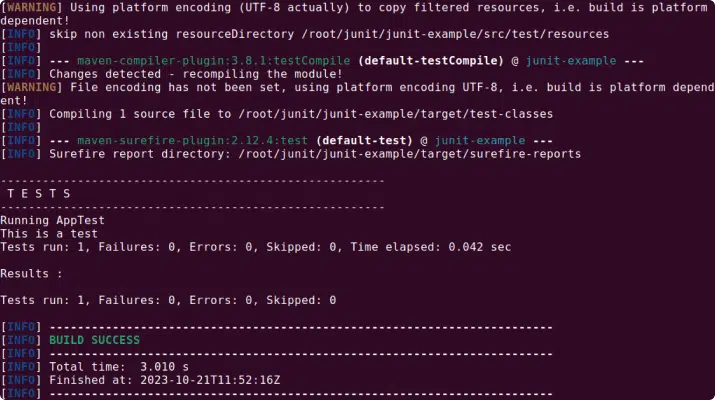
In JUnit, annotations are used to provide metadata about your tests. They can control the test flow and give information about the testing methods and classes. Here are some of the key annotations you will encounter:
@Test: Marks the method as a test method.@Before: Used to specify that a method will be invoked before each test. This is useful for setting up common test data.@After: Specifies a method that will be invoked after each test. This is often used to clean up test data.@BeforeClass: Identifies a method that will be run once before any test methods in the class. This could be used to set up more complex data structures.@AfterClass: Specifies a method that will be run once after all tests in the class have been run. This could be used for clean-up activities.import org.junit.*;
public class CalculatorTest {
@BeforeClass
public static void setUpClass() {
// Code to run once before any tests
System.out.println(“This code will run once before any tests”);
}
@Before
public void setUp() {
// Code to run before each test
System.out.println(“Code to run before each test”);
}
@Test
public void testAddition() {
// Your test code here
System.out.println(“The main test method”);
}
@After
public void tearDown() {
// Code to run after each test
System.out.println(“This code will run after each test”);
}
@AfterClass
public static void tearDownClass() {
// Code to run once after all tests are done
System.out.println(“This code will run once after all tests are finished”);
}
}
The output looks like this:
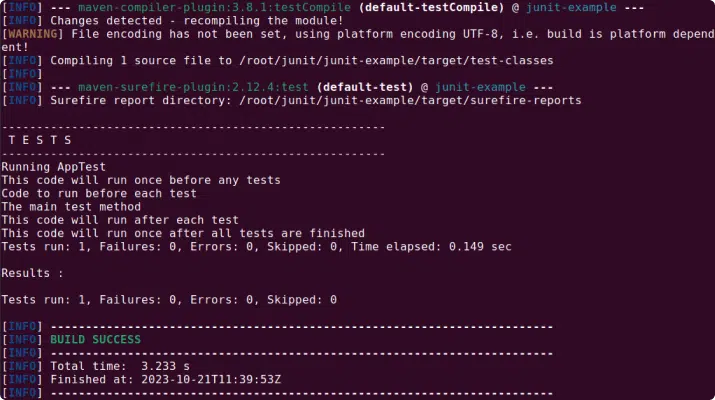
Assertions are the heart of your tests. They are what determine whether a test passes or fails. In JUnit, assertions are made using the ‘assert’ methods provided by the Assert class.
The assertEquals method, for example, checks that two values are the same. If they are not, the test fails. There’s also assertTrue and assertFalse for checking boolean conditions, and assertNotNull and assertNull for checking whether an object is null.
import org.junit.Assert;
import org.junit.Test;

public class CalculatorTest {

    @Test
    public void testAddition() {
        Calculator calculator = new Calculator();
        int result = calculator.add(2, 2);
        Assert.assertEquals(4, result);
    }
}
The output looks like this:
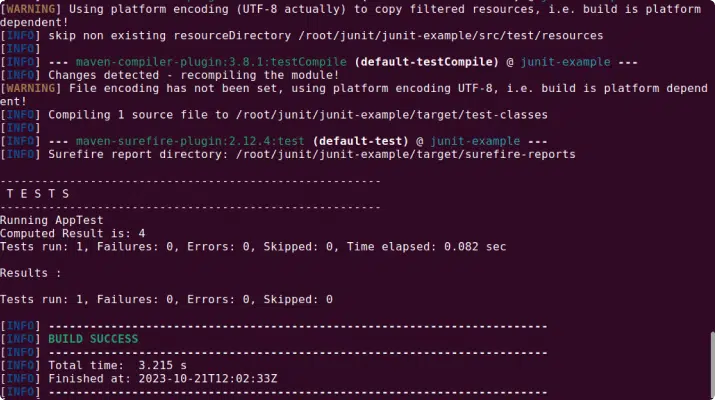
One of the fundamental principles of unit testing is that tests should be independent and isolated. That means that each test should stand on its own, and the result of one test should not affect the result of another test.
Keeping tests independent often means setting up and tearing down the test environment for each test. This can be done using the @Before and @After annotations that we learned about earlier. This ensures that each test starts with a fresh environment, free from any changes that might have been made by previous tests.
Good naming conventions can make your tests much easier to understand and maintain. A common convention is to name your test methods in a way that describes what they are testing.
For example, instead of naming a test method test1, you might name it testAdditionWithPositiveNumbers. This makes it immediately clear what the test is doing. It’s also helpful to follow a consistent naming pattern across your tests, to make it easier to find specific tests.
Logic in tests can make them harder to understand and more prone to errors. It’s generally best to avoid using conditions, loops, or other types of control flow in your tests.
Instead, aim to make your tests straightforward and linear. Each test should set up some data, perform an action, and then check the result. If you find yourself needing to use logic in a test, consider whether the test could be split into multiple smaller tests.
Each test method should test only one thing. This makes your tests simpler and easier to understand. It also makes it easier to identify the cause of a test failure.
For example, instead of having a single test method that tests both addition and subtraction, you would have two separate test methods: one for addition and one for subtraction. This way, if the test for addition fails, you know that the problem is specifically with the addition functionality.
Tabnine accelerates and simplifies the entire software development process with AI code assistant that helps developers create, test, fix, document and maintain code. Tabnine can also automatically generate and assist in creating or maintaining unit tests, helping developers increase test coverage, and catch issues earlier in deployment. If tests fail or bugs emerge, Tabnine will help diagnose the issue and propose code suggestions to fix the problem.
Tabnine is the AI coding assistant that helps development teams of every size use AI to accelerate and simplify the software development process without sacrificing privacy, security, or compliance. Tabnine boosts engineering velocity, code quality, and developer happiness by automating the coding workflow through AI tools customized to your team. Tabnine supports more than one million developers across companies in every industry.
Unlike generic coding assistants, Tabnine is the AI that you control:
It’s private. You choose where and how to deploy Tabnine (SaaS, VPC, or on-premises) to maximize control over your intellectual property. Rest easy knowing that Tabnine never stores or shares your company’s code.
It’s personalized. Tabnine delivers an optimized experience for each development team. It’s context-aware and delivers precise and personalized recommendations for code generation, code explanations, guidance, and for test and documentation generation.
It’s protected. Tabnine is built with enterprise-grade security and compliance at its core. It’s trained exclusively on open source code with permissive licenses, ensuring that customers are never exposed to legal liability.
Read more about AI for software development in our guide for AI coding tools.
Tabnine provides accurate and personalized code completions for code snippets, whole lines, and full functions. Tabnine Chat in the IDE allows developers to communicate with a chat agent in natural language and get assistance with various coding tasks, such as:
Try Tabnine for free today or contact us to learn how we can help accelerate your software development.
Code debugging is a systematic process that involves identifying and removing errors or bugs in a computer program. These errors can be syntax issues, logical errors, or runtime errors, each of which can hinder the smooth functioning of a program. Debugging involves tracing the source of these errors and correcting them to ensure the software runs as intended.
The term “debugging” is attributed to Admiral Grace Hopper, a pioneering computer scientist in the mid-20th century. While working on the Harvard Mark II computer, a moth lodged in the machine caused an error, leading Hopper to coin the term ‘debugging’ to describe the process of finding and fixing the issue.
Debugging is not a one-time process but rather an ongoing activity that continues throughout the software development lifecycle. It involves not just the removal of errors but also the prevention of potential bugs, making it a critical aspect of creating robust and reliable software. This is part of an extensive series about software development.
While code debugging and code testing are both integral parts of the software development process, they serve different purposes and are carried out at different stages. Code testing is a proactive process that involves checking a program for potential errors before its deployment. In agile development teams, tests are typically written by developers and either executed manually or as part of continuous integration (CI) pipeline.
On the other hand, code debugging is a reactive process that comes into play after an error has been identified. Whether the bug was discovered during testing, post-deployment, or by an end-user, debugging involves delving into the code to trace the source of the issue and rectify it. While testing aims to prevent bugs, debugging deals with the ones that slip through the cracks.
Print-based debugging, also known as “printf debugging,” is one of the simplest and most commonly used debugging techniques. It involves inserting print statements at various points in the code to output the values of certain variables or the flow of execution. These outputs can then be examined to trace the source of the error.
While this method may seem rudimentary compared to more sophisticated debugging tools, it is an effective way of gaining insights into the program’s behavior. Moreover, it is language-agnostic, making it a universally applicable technique. Another benefit is that this method can be used in a production environment, to provide insights of a problem after it occurred.
Breakpoints are a feature offered by many Integrated Development Environments (IDEs) and debuggers. They allow the programmer to pause the execution of the program at a specific point, enabling them to examine the state of the program, the values of variables, and the flow of execution.
This technique is particularly useful for debugging complex programs where the error might not be immediately apparent. By pausing the program at strategic points, the programmer can step through the code, examining each operation in detail to pinpoint the source of the bug.
Step-through debugging is a technique that involves executing the program one line at a time. This allows the programmer to closely observe the flow of execution and the changes in variable values, helping them identify any anomalies that could be causing the error.
Most IDEs and debuggers provide features for step-through debugging, such as “step into,” “step over,” and “step out.” These allow the programmer to control the execution flow, delve into function calls, and navigate through the code with precision.
Reverse debugging, also known as “backwards debugging” or “historical debugging,” is a technique that allows the programmer to step back in time to examine the state of the program at previous points in the execution. This can be useful for tracing non-deterministic bugs, which are difficult to reproduce and may not manifest every time the program is run.
While reverse debugging is a powerful tool, it is not commonly used due to the complexity and computational overhead involved. However, with advances in technology and the development of more efficient algorithms, it is becoming increasingly accessible.
To understand the process of debugging better, let’s look at some examples in different programming environments.
Visual Studio Code, or VS Code, is a popular code editor that comes with built-in debugging support. It offers a range of features designed to make the debugging process easier and more efficient.
To debug a program in VS Code, you first need to set breakpoints in your code. Breakpoints are markers that tell the debugger to pause execution at a certain point. Once the program reaches a breakpoint, you can inspect the current state of the variables and the call stack, step through the code line by line, and evaluate expressions on the fly.
The debugging functionality in VS Code is extensible, meaning that you can add support for different programming languages and debugging protocols via extensions.
Debugging in C can be challenging due to the language’s low-level nature. Fortunately, there are tools like GDB (GNU Debugger) that can help.
GDB allows you to set breakpoints, step through the code, and inspect the state of your program. It also supports conditional breakpoints, which only pause execution if a certain condition is met, and watchpoints, which trigger a pause whenever a specific variable changes.
One thing to keep in mind when debugging C code is the potential for memory-related bugs. These can be particularly tricky to track down, but tools like Valgrind can help by detecting memory leaks and other memory-related issues.
Learn more in our detailed guide to C code debugging
Debugging in Java can be done using various tools, but one of the most commonly used is the Java Debugger (JDB). JDB is a command-line tool that allows you to set breakpoints, step through the code, and inspect the state of your program.
However, many Java developers prefer to use integrated development environments (IDEs) like Eclipse or IntelliJ IDEA for debugging. These IDEs offer a more user-friendly interface for debugging and come with additional features like the ability to evaluate expressions on the fly, view the call stack, and navigate to the source of an exception.
Another useful tool for Java debugging is JUnit, a framework for writing and running tests. By writing tests for different parts of your code, you can quickly identify and fix bugs.
Python offers several tools for debugging, one of which is the built-in pdb module. pdb provides an interactive debugging environment where you can set breakpoints, step through the code, and inspect variables.
For a more user-friendly debugging experience, many Python developers use IDEs like PyCharm or Visual Studio Code. These IDEs provide a graphical interface for debugging, with features like conditional breakpoints, call stack inspection, and expression evaluation.
Another useful tool for Python debugging is the pytest framework. By writing tests for your code, you can quickly identify bugs and verify that your fixes have resolved them.
Learn more in our detailed guide to Python code debugging
For most developers, the process for fixing errors in your code starts with an IDE plug-in that notifies them there are errors in the code. Some of these tools provide recommendations that can help with simple errors.
However, for complex debugging, developers will have to manually investigate the error. This might require getting feedback from other developers or searching online for similar issues, based on the limited information provided from the debugging tool. Traditional debugging tools today don’t tell developers how to resolve the error, and the help they provide isn’t personalized to their specific problem. This makes it difficult and time-consuming to solve programming errors.
Tabnine’s AI code assistant makes debugging code errors much easier. As tools identify errors with the code and error notifications emerge in the problems tab, or inline using colored indicators, developers can simply click on the error indicator and ask the Tabnine coding assistant to suggest a fix.
In this demo video, you can see how Tabnine fixes an error identified in the IDE. It shows a React App written in TypeScript, where the IDE indicates coding errors, denoted by red underlines. The developer highlights line 26 and uses the /fix-code command in the chat.
Based on the response, you can see that the problem lies the usage of a process instead of a window. Tabnine can directly apply that change, resolving the error and saving valuable time, without leaving the IDE to search Google for solutions.
With an AI coding assistant like Tabnine, developers see massive efficiency gains by fixing errors almost instantly—instead of taking an hour to fix a complex issue, Tabnine can fix it in seconds. This improves productivity and increases developer velocity.
Try Tabnine for free today or contact us to learn how we can help accelerate your software development.
Tabnine is the AI coding assistant that helps development teams of every size use AI to accelerate and simplify the software development process without sacrificing privacy, security, or compliance. Tabnine boosts engineering velocity, code quality, and developer happiness by automating the coding workflow through AI tools customized to your team. Tabnine supports more than one million developers across companies in every industry.
Read more about AI for software development in our guide for AI coding tools.
Unlike generic coding assistants, Tabnine is the AI that you control:
It’s private. You choose where and how to deploy Tabnine (SaaS, VPC, or on-premises) to maximize control over your intellectual property. Rest easy knowing that Tabnine never stores or shares your company’s code.
It’s personalized. Tabnine delivers an optimized experience for each development team. It’s context-aware and delivers precise and personalized recommendations for code generation, code explanations, guidance, and for test and documentation generation.
It’s protected. Tabnine is built with enterprise-grade security and compliance at its core. It’s trained exclusively on open source code with permissive licenses, ensuring that customers are never exposed to legal liability.
Tabnine provides accurate and personalized code completions for code snippets, whole lines, and full functions. Tabnine Chat in the IDE allows developers to communicate with a chat agent in natural language and get assistance with various coding tasks, such as:
Together with our content partners, we have authored in-depth guides on several other topics that can also be useful as you explore the world of software development.
Authored by Configu
Authored by Swimm
Authored by Tigera
We’re thrilled to announce that GPT-4o — the newest and fastest model from OpenAI — is now available on Tabnine Chat. Starting today, you can use the GPT-4o model to power the full capabilities of Tabnine Chat, including code generation, code explanations, documentation generation, AI-created tests, and more. Additionally, when using the GPT-4o model, Tabnine Chat delivers highly personalized recommendations by utilizing the context from locally available data in your IDE.
Released on May 13, 2024, GPT-4o is the most powerful model from OpenAI and it represents a step towards more natural interaction between humans and computers. Among other use cases, the GPT-4o model is also well suited for software development use cases. Benchmarks from OpenAI demonstrate that GPT-4o matches the performance of GPT-4 Turbo for coding-related tasks. More importantly, the GPT-4o is significantly faster than all the previous GPT models and offers a 2x speed improvement over its predecessor, GPT-4 Turbo.
A few weeks ago, we launched the switchable models capability for Tabnine Chat that lets users switch the model that underpins Tabnine Chat in real time. One of our goals for this capability is to bring new, state-of-the-art models to Tabnine Chat as soon as they become available. With today’s announcement, we’re extending that capability with support for the GPT-4o model.
You can choose from the following models with Tabnine’s AI code assistant chat tools:
You’re not locked into any one of these models. Switch instantly between models for specific projects, use cases, or to meet the requirements of specific teams. We plan to make more models available for Tabnine Chat soon, which should help eliminate any fears about missing out on LLM innovations and make it simple to use new models as they emerge. It future-proofs your investment in AI and enables your team to focus on accelerating the software development life cycle using Tabnine.
During model selection, Tabnine provides transparency into the behaviors and characteristics of each of the available models to help you decide which one is right for your situation. For example, for projects where data privacy and legal risks are less important, you can use a model optimized for performance over compliance (such as Open AI’s GPT-4o). As you switch to working on projects that have stricter requirements for privacy and protection, you can change to a model like Tabnine Protected, which is built for that purpose. The underlying LLM can be changed with just a few clicks — and Tabnine Chat adapts instantly.
Check out this short video that shows the GPT-4o model in action:
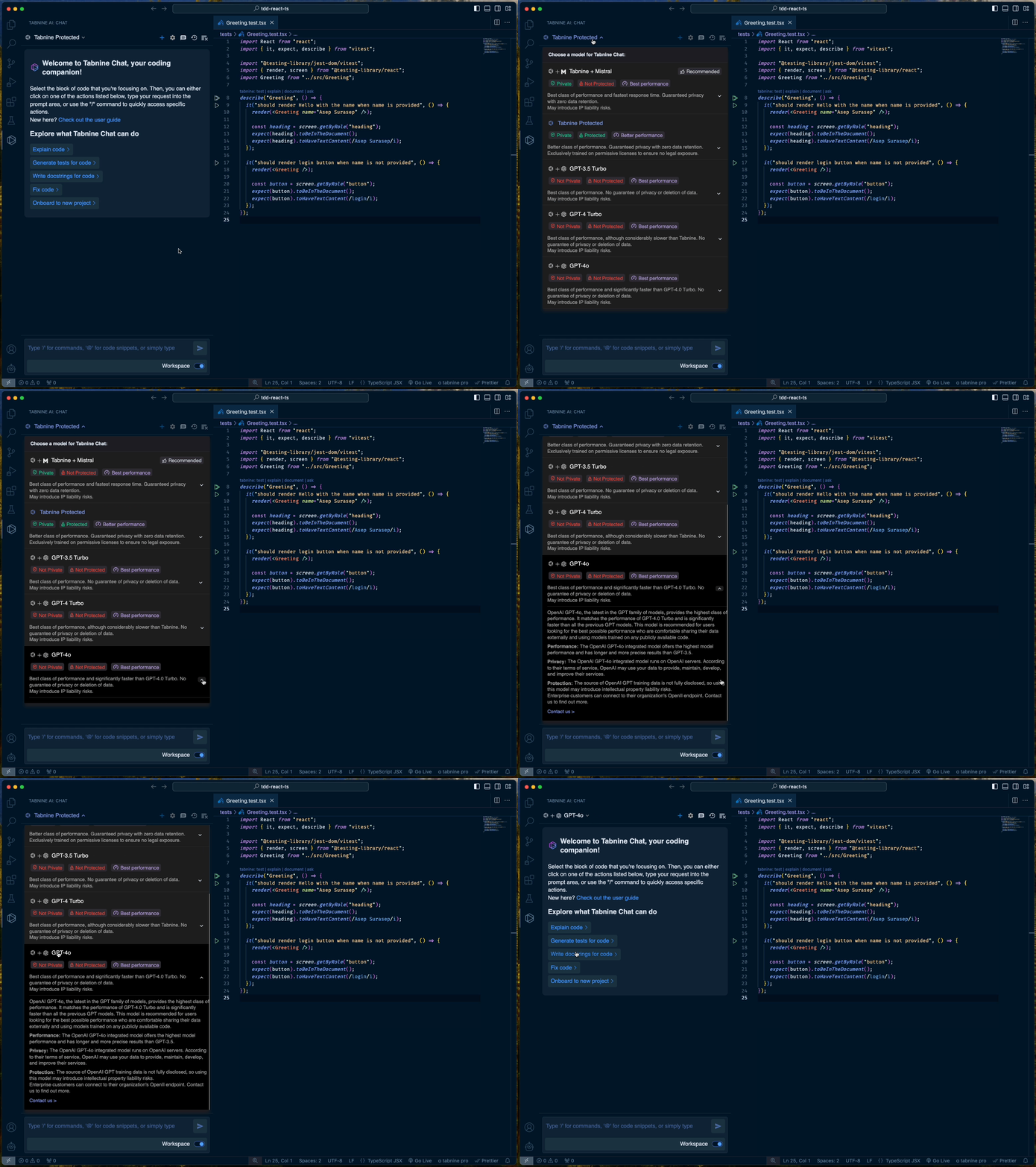
Starting today, the GPT-4o model is available to all Tabnine Pro users at no additional cost. Please make sure to use the latest version of the Tabnine plugin for your IDE to get access to the GPT-4o model. We plan on making the GPT-4o model available for Enterprise users in the near future.
Check out our Docs to learn more about this functionality. If you’re not yet a customer, you can sign up for Tabnine Pro today — it’s free for 90 days.
AI technologies, in particular coding assistants based on large language models (LLMs), are revolutionizing software testing by introducing automation to a range of new tasks, including generating scripts, creating unit tests, and writing human-readable code explanations.
By automating the generation of test scripts, AI minimizes the manual effort required in scripting and maintaining them. This is especially beneficial in adapting to changes within the application under test, ensuring that the scripts remain relevant and accurate over time. AI can help generate unit tests, automating the validation of individual units of source code and reducing the burden on developers and testers. AI can also enhance knowledge sharing through automated code explanations and documentation.
This is part of a series of articles about AI coding tools.
In traditional software testing, activities such as writing unit tests and maintaining them across different versions of the software require significant manual effort and are prone to human error. AI testing tools introduce automation to these processes, replacing the monotonous and error-prone aspects of manual testing.
Through AI, unit tests can be generated and updated automatically, reflecting changes in the software without the need for manual intervention. This not only speeds up the testing process but also enhances the accuracy and reliability of the tests.
Furthermore, AI-driven testing tools are equipped to handle test maintenance efficiently, updating tests to align with new features or changes in the software. This capacity for automatic adjustment reduces the burden on testers and developers, improves test coverage and ultimately improves software quality with the same testing resources.
Read more in our guide about Generative AI for software development.
Using AI-enabled tools to test software offers the following benefits:
There are several ways that AI can be used to test software.
AI tools can create test scripts from requirements documentation, user stories, or application interfaces. This process reduces the manual effort involved in writing and maintaining test scripts, enabling testers to focus on more complex tasks. Automated scripts are adaptable, updating as applications evolve.
Unit tests validate the smallest parts of an application’s codebase. This ensures each component functions correctly in isolation, facilitating early detection of defects. AI-driven unit test generation analyzes the source code to create relevant test cases, optimizing test coverage and efficiency. This can reduce the huge manual effort most development teams spend on writing unit tests.
AI can be used to run predefined, dynamically generated test cases across different environments and configurations. This automation speeds up the testing process, allowing more extensive testing within shorter periods. AI algorithms optimize test sequences, predict outcomes, and adapt strategies based on results, enhancing test effectiveness.
Self-healing in AI testing refers to the automatic adjustment of test scripts when application changes occur. AI algorithms detect UI or API modifications and update test cases accordingly, reducing maintenance and ensuring tests remain relevant. This capability minimizes testing disruptions, providing consistent feedback despite ongoing development changes.
AI-driven code explanation and documentation tools automate the creation of technical documentation and code comments. This ensures code is easily understandable, facilitating maintenance and updates. Automation of these tasks reduces the technical debt associated with poorly documented code, improving code quality and developer productivity. By generating clear, consistent documentation, AI helps maintain software architecture and design knowledge.
Related content: Read our article about AI pair programming

Tabnine is an AI coding assistant tool designed to be a companion, mentor, and helper within your IDE. Tabnine can support software testing among many other development activities. Tabnine assists with software testing by offering predictive suggestions for potential test cases based on the code being written. Request Tabnine to write tests for specific functions or code, Tabnine returns test cases, implementation, and assertions and suggests tests that align with the testing framework and structure already in use in your project.
Key features include:
Try Tabnine for free today or contact us to learn how we can help accelerate your software development.

Tricentis Tosca aims to eliminate common bottlenecks in testing. It is a codeless test automation solution that addresses the end-to-end testing lifecycle.
Key features include:
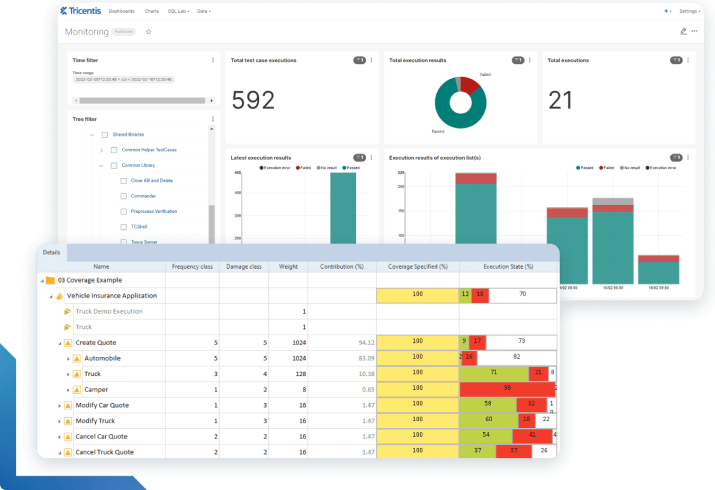
Source: Tricentis Tosca
While Tricentis Tosca offers a robust solution for test automation, it’s important to consider its limitations (sourced from G2):

Parasoft offers a suite of solutions that aim to accelerate the testing process, helping teams detect and remediate defects as early as possible in the software lifecycle.
Key features include:
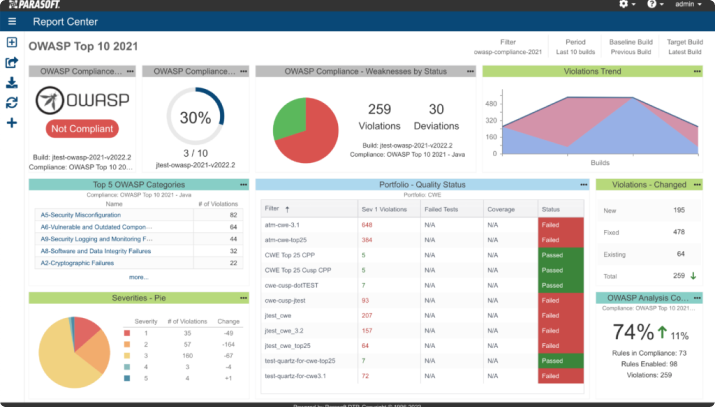
Source: Parasoft
Despite its robust features, users have noted several shortcomings of the solution (sourced from G2):

Testsigma is a test automation platform that leverages Natural Language Processing (NLP) and low-code solutions to create automated tests with minimal maintenance. It emphasizes reliability, and scalability, and aims to make quality engineering accessible to teams regardless of their coding expertise.
Key features include:
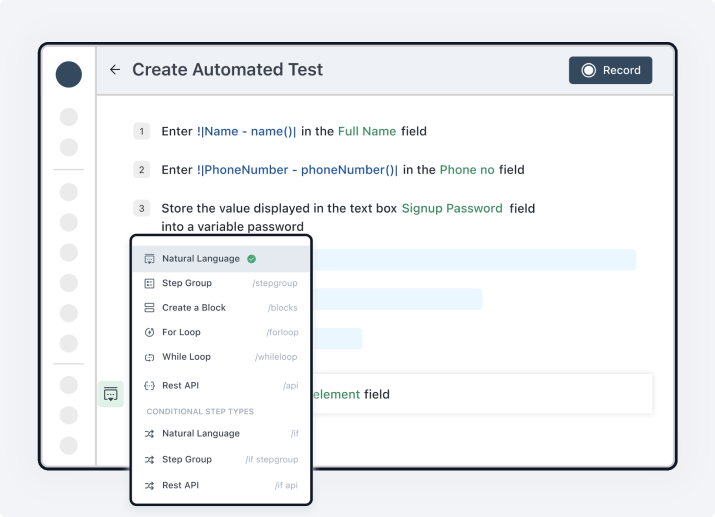
Source: Testsigma
Despite its innovative approach and powerful features, Testsigma users have identified areas for improvement (sourced from G2):

Katalon’s testing platform aims to increase efficiency, provide clear insights, and streamline the test automation process. Making use of AI across its suite, Katalon helps teams write tests faster and improve quality in complex software environments.
Key features include:
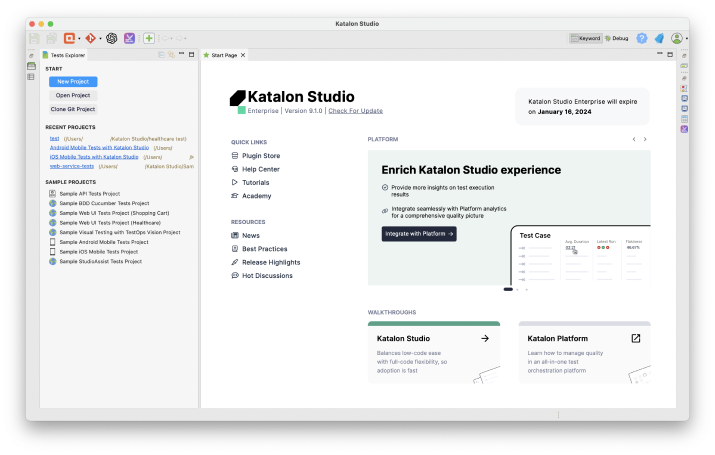
Source: Katalon
While Katalon provides a comprehensive and AI-enhanced testing solution, users have reported some limitations (sourced from G2):
In conclusion, the integration of AI into software testing marks a significant evolution in the field. By automating tasks such as script generation, unit test creation, and code documentation, AI technology not only saves time and resources but also enhances the overall quality and reliability of software products.
The adoption of AI in software testing supports broader development methodologies, such as DevOps, by facilitating continuous testing and rapid feedback loops. As we look to the future, it’s clear that AI will continue to play a central role in shaping the practices and principles of software testing, driving innovation and excellence in software development.
Try Tabnine for free today or contact us to learn how we can help accelerate your software development.